Brawl Saloon
Code language : C#
Software : Unity engine, Github an Trello
Team size : 8
My role : developer
Date : 16-03-2026 t/m 22-05-2026

Introduction to this project
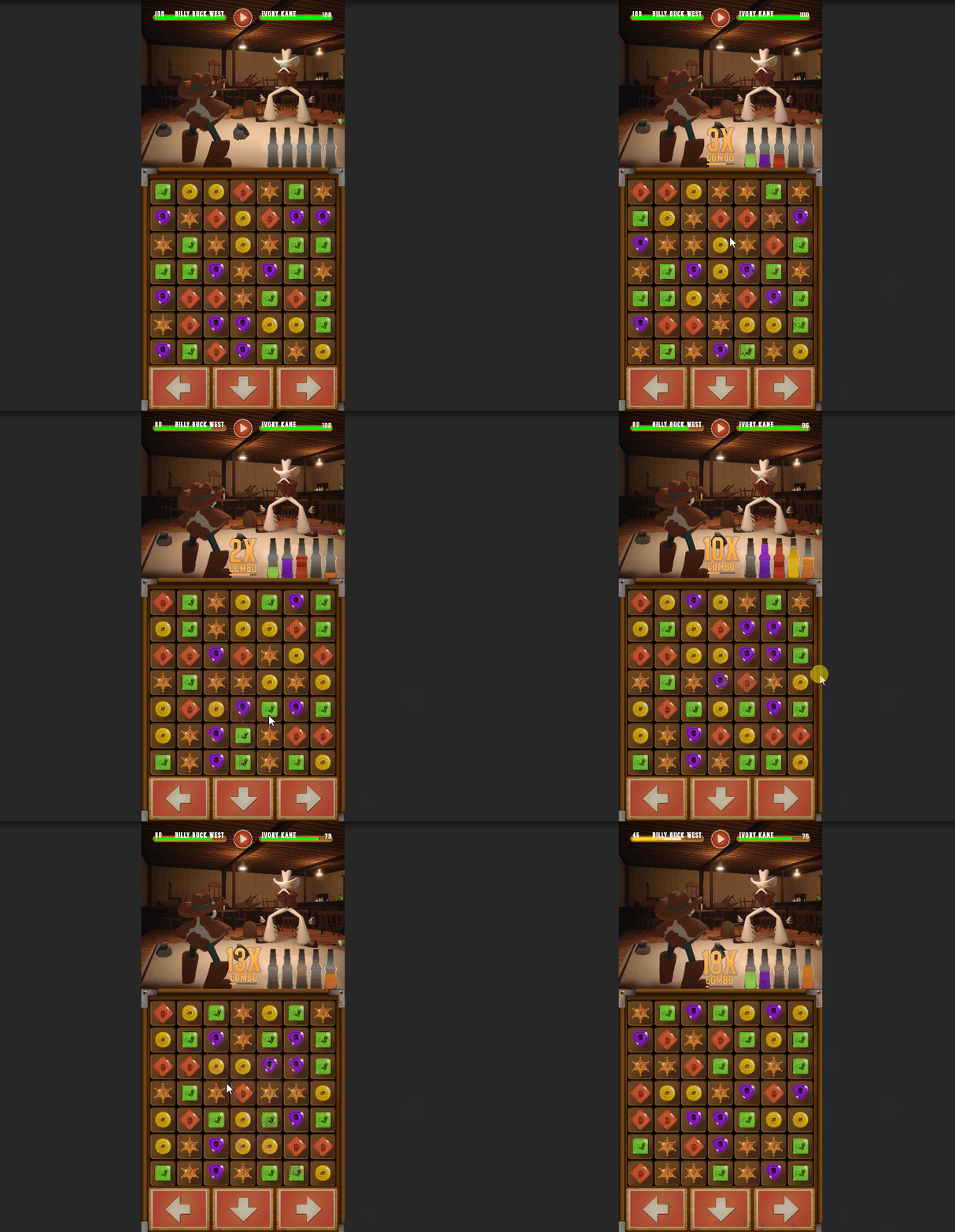
This is the project I helped creating for my exam. Brawl Saloon is a real-time combat and match-3 hybrid game designed for mobile devices. The goal as the player is to match as fast as possible to attack the enemy and to avoid the attacks from the enemy by dodging them.
My Contribution to this project
I designed and developed the grid system and match 3 system.
Grid system design
When designing the grid system, I wanted to ensure strong performance across mobile devices while keeping the architecture flexible for future features and content updates.
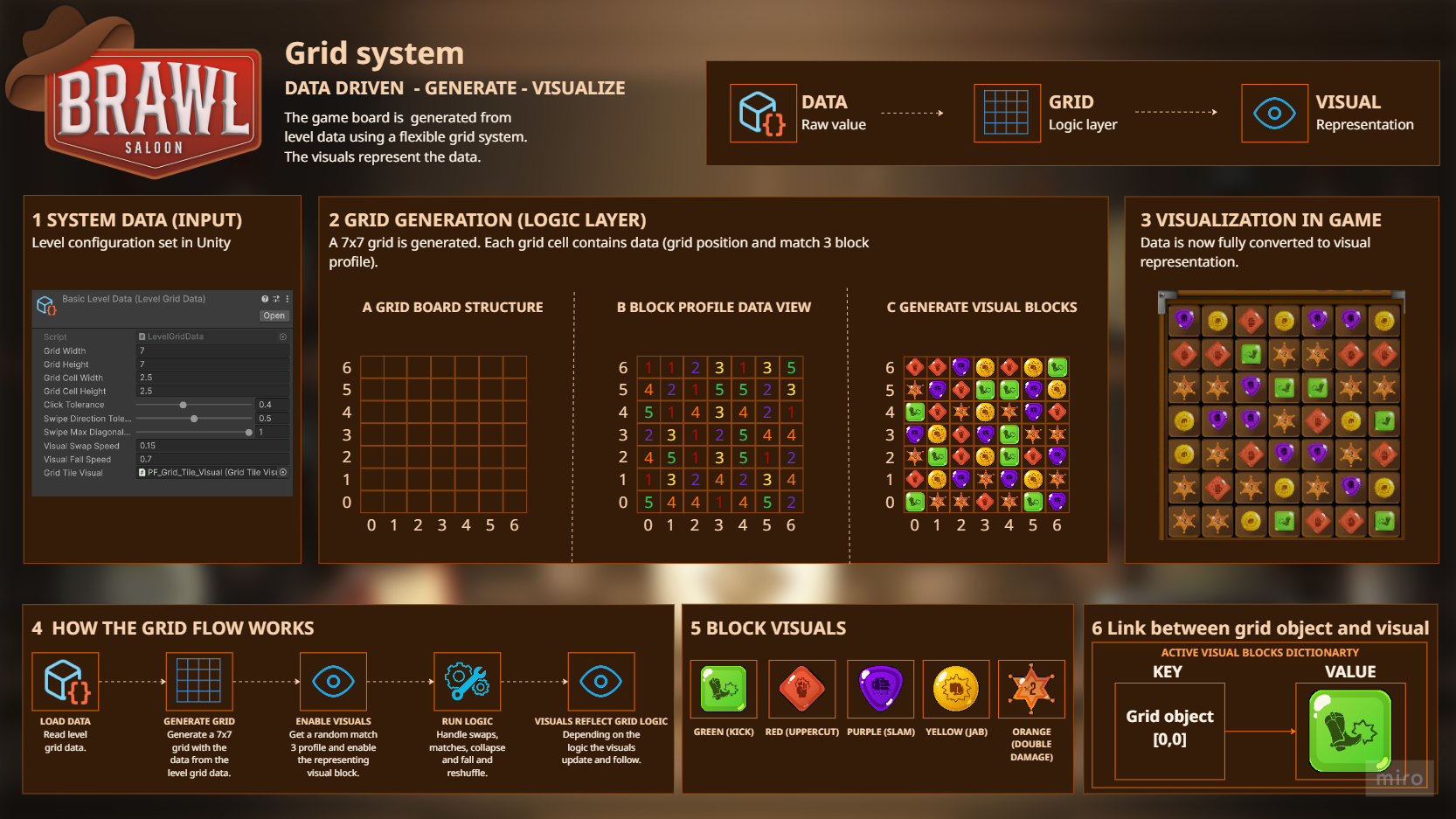
To achieve this, I separated the system into three layers: Data (truth), Logic (rules), and Visuals (representation). The grid itself is fully data-driven, allowing the logic to operate independently from the visuals, which improves performance and maintainability.
This separation also makes the system highly scalable. New block types, mechanics, or visual themes can be added without changing the core grid logic
Data architecture
The grid system is split into several focused classes: GridPosition, GridObject, GridSystem, GridHit, LevelGrid, and LevelGridData.
GridObject
GridObject represents the data stored on a specific position within the grid. Each object contains:
• A GridPosition reference to track its location within the grid
• A reference to a Match-3 block profile defining its gameplay behavior and visuals
This allows the grid to remain fully data-driven while keeping the gameplay logic independent from the visual representation.
GridObject class
using UnityEngine;
public class GridObject
{
private GridPosition _gridPosition;
private Match3BlockProfile _match3BlockProfile;
public GridObject(GridPosition gridPosition) => _gridPosition = gridPosition;
public GridPosition GetGridPosition => _gridPosition;
public Vector3 GetWorldPosition(float cellWidth, float cellHeight) => new Vector3(_gridPosition.X * cellWidth + cellWidth / 2, _gridPosition.Y * cellHeight + cellHeight / 2, 0);
public Match3BlockProfile GetMatch3BlockProfile => _match3BlockProfile;
public void SetGridPosition(GridPosition gridPosition) => _gridPosition = gridPosition;
public void SetMatch3BlockProfile(Match3BlockProfile match3BlockProfile) => _match3BlockProfile = match3BlockProfile;
}
Match-3 block profiles
The block profile is a scriptable object that contains data for a certain block profile. This data includes:
• A match effect
• A list of rule flags
The rules let the profile work with certain actions. For example if the profile does not have the CollapseAndFillRuleFlag, when the board does this action this profile and the visual block don`t fall down on the board
Each GridObject stores a reference to one profile. This allows other gameplay systems to use the profile to for example:
• If there is a match after a swap
• Detecting if there is any possible move left
• When matches activating the match effect that is hold by the profile
Also the profile is used by the BlockVisualManager to link the profile to a match 3 block visual.
GridSystem
GridSystem contains the core grid logic and is implemented as a pure C# class rather than a standard MonoBehaviour.
When initialized, the class generates the grid using the provided level data and stores all grid data inside a 2D array structure.
The system exposes multiple helper methods, including but not limit to:
• Converting touch positions into grid hits
• Swapping grid data
• Disposing grid data
• Grid bounds validation
• Calculating grid end position for click and swipe move
This approach keeps the data separated from both input handling and visual systems. The data is only the truth of the grid.
ConvertScreenPositionToGridHit()
public GridHit ConvertScreenPositionToGridHit(Vector2 worldPosition)
{
var localPos = CameraHolder.Match3Camera.ScreenToWorldPoint(worldPosition);
var rawX = localPos.x / _cellWidth;
var rawY = localPos.y / _cellHeight;
var gridX = Mathf.FloorToInt(rawX);
var gridY = Mathf.FloorToInt(rawY);
return new GridHit(new GridPosition(gridX, gridY), rawX, rawY, localPos);
}
SwapGridObjectsData()
public void SwapGridObjectsData(GridObject gridObjectA, GridObject gridObjectB)
{
var gridPositionA = gridObjectA.GetGridPosition;
var gridPositionB = gridObjectB.GetGridPosition;
_gridObjectArray[gridPositionA.X, gridPositionA.Y] = gridObjectB;
_gridObjectArray[gridPositionB.X, gridPositionB.Y] = gridObjectA;
gridObjectA.SetGridPosition(gridPositionB);
gridObjectB.SetGridPosition(gridPositionA);
}
DisposeMatchData()
public void DisposeMatchData(HashSet<Match> matches)
{
foreach (var match in matches)
{
for (int i = 0; i < match.MatchedObjectGroup.Length; i++)
{
var gridPos = new GridPosition(match.MatchedObjectGroup[i].GetGridPosition.X, match.MatchedObjectGroup[i].GetGridPosition.Y);
_gridObjectArray[gridPos.X, gridPos.Y].SetMatch3BlockProfile(null);
}
}
}
CheckGridBounds()
public GridPosition CheckGridBounds(GridPosition pos)
{
var x = Mathf.Clamp(pos.X, 0, _width - 1);
var y = Mathf.Clamp(pos.Y, 0, _height - 1);
return new GridPosition(x, y);
}
CalculateSwipeEndGridPosition() and CalculateClickedEndGridPosition()
public GridPosition CalculateSwipeEndGridPosition(GridHit beginHit, GridHit endHit, float swipeDirectionTolerance, float swipeMaxDiagonalDeviation)
{
var delta = endHit.LocalPos - beginHit.LocalPos;
var absX = Mathf.Abs(delta.x);
var absY = Mathf.Abs(delta.y);
var tolerance = swipeDirectionTolerance;
var maxDiagonalTolerance = swipeMaxDiagonalDeviation;
var ratio = absX > absY ? absY / absX : absX / absY;
if (ratio > maxDiagonalTolerance)
return beginHit.HitGridPosition;
if (ratio > tolerance)
return beginHit.HitGridPosition;
var horizontal = absX > absY;
if (horizontal)
{
var dir = delta.x > 0 ? 1 : -1;
return new GridPosition(beginHit.HitGridPosition.X + dir, beginHit.HitGridPosition.Y);
}
else
{
var dir = delta.y > 0 ? 1 : -1;
return new GridPosition(beginHit.HitGridPosition.X, beginHit.HitGridPosition.Y + dir);
}
}
public GridPosition CalculateClickedEndGridPosition(GridPosition beginGridPosition, float rawX, float rawY, float clickTolerance)
{
var startX = beginGridPosition.X;
var startY = beginGridPosition.Y;
var deltaX = rawX - startX;
var deltaY = rawY - startY;
var distanceX = Mathf.FloorToInt(rawX) - startX;
var distanceY = Mathf.FloorToInt(rawY) - startY;
if (Mathf.Abs(deltaX) >= 3f || Mathf.Abs(deltaY) >= 3f) return beginGridPosition;
if (Mathf.Abs(distanceX) >= 1 && Mathf.Abs(distanceY) >= 1) return beginGridPosition;
if (Mathf.Abs(distanceX) == 0 && Mathf.Abs(distanceY) == 0) return beginGridPosition;
if (distanceX == 1) return new GridPosition(startX + 1, startY);
if (distanceX == -1) return new GridPosition(startX - 1, startY);
if (distanceY == 1) return new GridPosition(startX, startY + 1);
if (distanceY == -1) return new GridPosition(startX, startY - 1);
if (Mathf.Abs(deltaX) > Mathf.Abs(deltaY))
{
rawY = startY;
}
else
{
rawX = startX;
}
if (rawX > startX)
{
rawX -= clickTolerance;
var newGridPositionX = Mathf.FloorToInt(rawX);
distanceX = newGridPositionX - startX;
if (distanceX >= 2) return new GridPosition(startX, startY);
return new(startX + 1, startY);
}
else if (rawX < startX)
{
rawX += clickTolerance;
var newGridPositionX = Mathf.FloorToInt(rawX);
distanceX = newGridPositionX - startX;
if (distanceX <= -2) return new GridPosition(startX, startY);
return new(startX - 1, startY);
}
if (rawY > startY)
{
rawY -= clickTolerance;
var newGridPositionY = Mathf.FloorToInt(rawY);
distanceY = newGridPositionY - startY;
if (distanceY >= 2) return new GridPosition(startX, startY);
return new(startX, startY + 1);
}
else if (rawY < startY)
{
rawY += clickTolerance;
var newGridPositionY = Mathf.FloorToInt(rawY);
distanceY = newGridPositionY - startY;
if (distanceY <= -2) return new GridPosition(startX, startY);
return new(startX, startY - 1);
}
return beginGridPosition;
}
LevelGrid
LevelGrid acts as the controller between player input and the grid logic.
The class listens for player interactions with the board and uses the helper methods from GridSystem to validate moves and trigger swap actions when valid input is detected.
OnNewFingerUpInput()
private void OnNewFingerUpInput(Vector2 fingerPosition)
{
if (!_allowInput) return;
var newGridHit = _gridSystem.ConvertScreenPositionToGridHit(fingerPosition);
var endTouchGridPosition = newGridHit;
if (endTouchGridPosition.HitGridPosition == _beginTouchGridPosition.HitGridPosition && !_currentSelectedGridPosition.HasValue)
{
_currentSelectedGridPosition = _beginTouchGridPosition;
_gridSystem.SelectTileByGridPosition(_currentSelectedGridPosition.Value.HitGridPosition);
return;
}
var isClickMove = _beginTouchGridPosition.HitGridPosition == endTouchGridPosition.HitGridPosition;
if (isClickMove)
{
var endGridPosition = _gridSystem.CalculateClickedEndGridPosition(_currentSelectedGridPosition.Value.HitGridPosition, endTouchGridPosition.RawX, endTouchGridPosition.RawY, levelGridData.ClickTolerance);
endGridPosition = _gridSystem.CheckGridBounds(endGridPosition);
if (endGridPosition == _currentSelectedGridPosition.Value.HitGridPosition)
{
ResetCurrentGridPosition();
return;
}
if (_gridSystem.IsDiagonalMove(_currentSelectedGridPosition.Value.HitGridPosition, endGridPosition))
{
ResetCurrentGridPosition();
return;
}
HandleMove(_currentSelectedGridPosition.Value.HitGridPosition, endGridPosition);
}
else
{
var endGridPosition = _gridSystem.CalculateSwipeEndGridPosition(_beginTouchGridPosition, endTouchGridPosition, levelGridData.SwipeDirectionTolerance, levelGridData.SwipeMaxDiagonalDeviation);
endGridPosition = _gridSystem.CheckGridBounds(endGridPosition);
HandleMove(_beginTouchGridPosition.HitGridPosition, endGridPosition);
}
_currentSelectedGridPosition = null;
}
HandleMove()
private void HandleMove(GridPosition beginGridPosition, GridPosition endGridPosition)
{
if (_currentSelectedGridPosition != null) _gridSystem.DeselectTileByGridPosition(_currentSelectedGridPosition.Value.HitGridPosition);
_allowInput = false;
var beginGridObject = _gridSystem.GetGridObjectByGridPosition(beginGridPosition);
var endGridObject = _gridSystem.GetGridObjectByGridPosition(endGridPosition);
if (beginGridObject == null || endGridObject == null || beginGridObject == endGridObject)
{
_allowInput = true;
return;
}
if (!beginGridObject.GetMatch3BlockProfile.HasRule("Swap") || !endGridObject.GetMatch3BlockProfile.HasRule("Swap"))
{
_allowInput = true;
return;
}
var swapParameters = new SwapActionParameters
{
Context = _actionContext,
From = beginGridObject,
To = endGridObject,
};
gridActionProcessor.ProcessAction(new SwapAction(swapParameters));
}
LevelGridData
The grid configuration is stored inside a ScriptableObject called LevelGridData.
This data container defines the base grid setup, including:
• Grid dimensions
• Swipe and click tolerance
• Tile background visual reference
Using a ScriptableObject allows the grid to be configured directly in the Unity editor while keeping the runtime logic fully data-oriented.
Visual architecture
The visual layer is managed by the BlockVisualManager. This system is responsible for:
• Enabling and disabling block visuals
• Applying visual feedback and animations using DOTween
• Maintaining the link between GridObjects and their visual representations
• Managing block profile to visual prefab mappings
• Filling and controlling the object pool for performant runtime spawning
The visual system is fully separated from the gameplay logic. This allows the grid logic to remain completely data-driven while visuals dynamically respond to changes in the grid state.
By decoupling visuals from logic, new block types, visual themes, and animation behaviours can be added without modifying the core system.
Dictionaries
private Dictionary<Match3BlockProfile, GameObject> _profileToVisualsDictionary;
private Dictionary<Match3BlockProfile, List<GameObject>> _pool;
private Dictionary<GridObject, GameObject> _activeBlockVisuals;
InitializePool()
private void InitializePool()
{
_activeBlockVisuals = new Dictionary<GridObject, GameObject>();
_profileToVisualsDictionary = new Dictionary<Match3BlockProfile, GameObject>();
_pool = new Dictionary<Match3BlockProfile, List<GameObject>>();
foreach (var profileToVisual in profileToVisuals)
{
_profileToVisualsDictionary.Add(profileToVisual.Match3BlockProfile, profileToVisual.Visual);
_pool.Add(profileToVisual.Match3BlockProfile, new List<GameObject>());
for (int i = 0; i < initialPoolSizePerMatch3Block; i++)
{
var newBlock = Instantiate(profileToVisual.Visual, transform);
newBlock.SetActive(false);
_pool[profileToVisual.Match3BlockProfile].Add(newBlock);
}
}
}
MoveVisualBinding()
public void MoveVisualBinding(GridObject from, GridObject to)
{
if (!_activeBlockVisuals.TryGetValue(from, out var visual)) return;
_activeBlockVisuals.Remove(from);
_activeBlockVisuals[to] = visual;
}
CreateVisualMoveTween()
public Tween CreateVisualMoveTween(GridObject gridObject, Vector3 newPosition, float tweenSpeed, Ease ease, float tweenStrength)
{
if(!_activeBlockVisuals.TryGetValue(gridObject, out var targetVisual)) return null;
return targetVisual.transform.DOMove(newPosition, tweenSpeed).SetEase(ease, tweenStrength).Pause();
}
TryEnableVisualByProfile()
public bool TryEnableVisualByProfile(Match3BlockProfile match3BlockProfile, GridObject gridObject, Func<GridPosition, Vector3> GetWorldPos, float yOffset = 0)
{
if (!_pool.TryGetValue(match3BlockProfile, out var listOfVisuals)) return false;
foreach (var visual in listOfVisuals)
{
if (visual.activeInHierarchy) continue;
_activeBlockVisuals.Add(gridObject, visual);
var visualPosition = GetWorldPos(gridObject.GetGridPosition);
visualPosition.y = visualPosition.y + yOffset;
visual.transform.position = visualPosition;
visual.SetActive(true);
break;
}
return true;
}
Match 3 system
First I created the match 3 gameplay flow with Ienumarator. It worked, however I needed a way to have full control of the flow to add or even cancel logic.
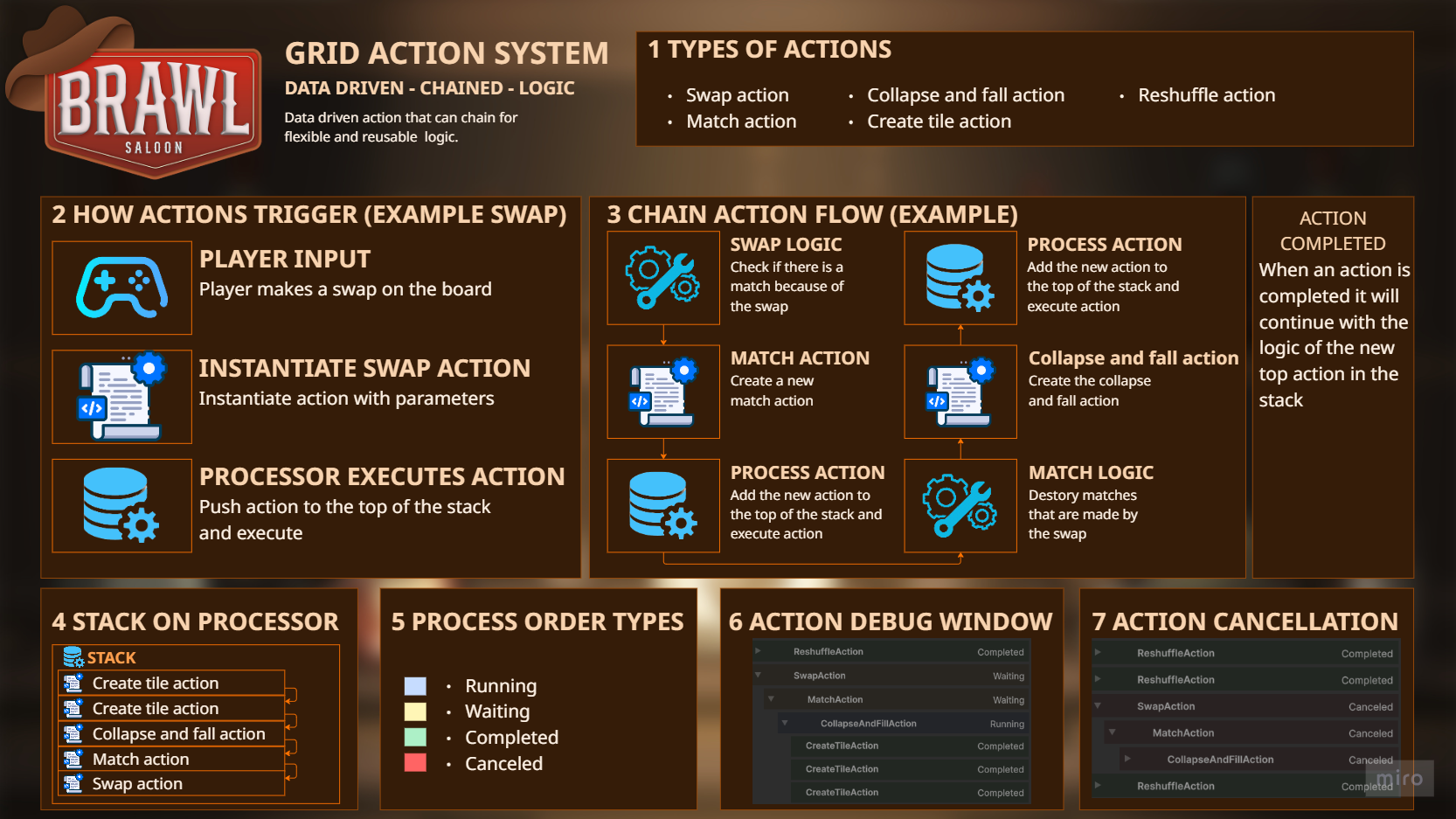
When I was talking to a lead developer he show me his thought process on this problem. After discussing the problem with a lead developer, I explored his action-based architecture where gameplay flow is represented as chained actions. Every action has it`s own logic and can trigger other actions and chain them.
This was perfect solution for my problem, so I started to design and make my own action system.
Actions architecture
The system consists of two main components:
• GridActionProcessor
• GridActions
Actions are implemented as pure C# classes that can be instantiated and submitted to the GridActionProcessor, which manages execution flow and action chaining.
GridActionProcessor
GridActionProcessor acts as the controller of the action system. When a new action is given to the processor:
• Adds the action to the stack
• Checks whether another action is currently active
• Adds newly created actions to the active action`s chained action list
• Executes the action
• Invokes the OnParentActionCompleted event when the root action has finished
ProcessAction()
public void ProcessAction<Tparameters>(BaseAction<Tparameters> action, Action<BaseAction> onComplete = null)
{
if(_actionStack.TryPeek(out var parentAction))
{
if (parentAction.IsCanceled) return;
parentAction.SetActionState(BaseAction.ActionState.Waiting);
action.Parent = parentAction;
parentAction.ChainedActions.Add(action);
}
_actionStack.Push(action);
action.SetActionState(BaseAction.ActionState.Running);
ActionDebugRegistry.ActiveActions.Add(action);
action.Execute(completedAction =>
{
OnActionComplete(completedAction);
onComplete?.Invoke(completedAction);
});
}
OnActionCOmplete()
private void OnActionComplete(BaseAction source)
{
if (source.Root == source) OnParentActionComplete?.Invoke();
source.SetActionState(BaseAction.ActionState.Completed);
source.Parent?.SetActionState(BaseAction.ActionState.Running);
_actionStack.Pop();
}
CancelCurrentChain()
public void CancelCurrentChain()
{
if (!_actionStack.TryPeek(out var current)) return;
current.Root.Cancel();
_actionStack.Clear();
}
Actions
The actions holds the logic. For example the swap action:
• Request a data swap of two grid objects
• Triggers a tween animation between the corresponding visuals.
Actions can trigger additional actions during execution. Newly created actions are pushed onto the processor stack while the parent action enters a waiting state until all chained actions are completed.
Once a chained action is completed, the action before that will continue with their logic.
Base action class
using System;
using System.Collections.Generic;
using DG.Tweening;
using UnityEngine;
public abstract class BaseAction
{
protected ActionContext action_context;
protected Action<BaseAction> on_action_complete;
public ActionState State { get; private set; }
public BaseAction Parent;
public readonly List<BaseAction> ChainedActions = new List<BaseAction>();
public bool IsCanceled => State == ActionState.Canceled;
public BaseAction Root
{
get
{
var current = this;
while (current.Parent != null)
current = current.Parent;
return current;
}
}
public virtual void Execute(Action<BaseAction> OnActionComplete) { }
public virtual void Cancel()
{
if (State == ActionState.Canceled || State == ActionState.Completed) return;
State = ActionState.Canceled;
foreach (var child in ChainedActions)
{
child.Cancel();
}
}
protected void CompleteAction()
{
if (IsCanceled) return;
State = ActionState.Completed;
on_action_complete?.Invoke(this);
}
public void SetActionState(ActionState actionState) => this.State = actionState;
public enum ActionState
{
Waiting,
Running,
Completed,
Canceled
}
}
public abstract class BaseAction<Tparameters> : BaseAction
{
public Tparameters parameters { get; private set; }
public BaseAction(Tparameters parameters) : base() => this.parameters = parameters;
}
Swap action class
using DG.Tweening;
using System;
public class SwapAction : BaseAction<SwapActionParameters>
{
private Sequence _sequence;
public SwapAction(SwapActionParameters parameters) : base(parameters) { }
public override void Execute(Action<BaseAction> OnActionComplete)
{
on_action_complete = OnActionComplete;
action_context = parameters.Context;
if (IsCanceled) return;
_sequence = DOTween.Sequence();
HandleForwardSwap();
}
private void HandleForwardSwap()
{
if (IsCanceled) return;
AudioManager.Instance.PlaySound("StoneSwitch");
var from = parameters.From;
var to = parameters.To;
action_context.GridSystem.SwapGridObjectsData(from, to);
var tweens = action_context.BlockVisualManager.SwapVisualTweens(
from,
to,
action_context.GridSystem.ConvertGridPositionToWorldPosition,
action_context.LevelGridData.VisualSwapSpeed,
Ease.InOutQuad
);
foreach (var t in tweens)
{
if (IsCanceled) break;
_sequence.Join(t);
}
_sequence.AppendCallback(OnForwardSwapComplete);
}
private void OnForwardSwapComplete()
{
if (IsCanceled) return;
var matches = action_context.MatchDetector.CheckForAllMatches(
action_context.GridSystem.GetGridObjectArray,
action_context.LevelGridData.GridWidth,
action_context.LevelGridData.GridHeight
);
if (matches.Count <= 0)
{
HandleReverseSwap();
return;
}
action_context.GridActionProcessor.ProcessAction(
new MatchAction(new MatchActionParameters
{
Matches = matches,
Context = action_context
}),
_ => CompleteAction()
);
}
private void HandleReverseSwap()
{
if (IsCanceled) return;
AudioManager.Instance.PlaySound("StoneSwitch");
var from = parameters.From;
var to = parameters.To;
action_context.GridSystem.SwapGridObjectsData(from, to);
var tweens = action_context.BlockVisualManager.SwapVisualTweens(
from,
to,
action_context.GridSystem.ConvertGridPositionToWorldPosition,
action_context.LevelGridData.VisualSwapSpeed,
Ease.InOutQuad
);
var reverseSequence = DOTween.Sequence();
foreach (var t in tweens)
{
if (IsCanceled) break;
reverseSequence.Join(t);
}
reverseSequence.OnComplete(OnReverseSwapComplete);
_sequence = reverseSequence;
}
private void OnReverseSwapComplete()
{
if (IsCanceled) return;
CompleteAction();
}
public override void Cancel()
{
base.Cancel();
if (_sequence != null && _sequence.IsActive())
{
_sequence.Kill();
}
}
}
Reshuffle action class
using System;
using System.Collections.Generic;
using DG.Tweening;
using UnityEngine;
public class ReshuffleAction : BaseAction<ReshuffleActionParameters>
{
private GridObject[,] _grid;
private float _spawnOffset = 5f;
private Sequence _sequence;
private List<Tween> _tweens;
public ReshuffleAction(ReshuffleActionParameters parameters) : base(parameters) { }
public override void Execute(Action<BaseAction> OnActionComplete)
{
on_action_complete = OnActionComplete;
action_context = parameters.Context;
_grid = action_context.GridSystem.GetGridObjectArray;
_tweens = new List<Tween>();
ReshuffleGrid();
}
private void ReshuffleGrid()
{
_tweens.Clear();
_sequence = DOTween.Sequence();
foreach (var gridObject in _grid)
{
if (IsCanceled) break;
action_context.BlockVisualManager.TryDisableVisualOnGridObject(gridObject);
gridObject.SetMatch3BlockProfile(null);
}
for (var x = 0; x < action_context.LevelGridData.GridWidth; x++)
{
if (IsCanceled) break;
for (int y = 0; y < action_context.LevelGridData.GridHeight; y++)
{
if (IsCanceled) break;
var newTileAction = new CreateTileAction(new CreateTileActionParameters
{
Context = action_context,
TargetGridPosition = new GridPosition(x, y),
SpawnYOffset = _spawnOffset,
TargetGridObject = _grid[x, y]
});
action_context.GridActionProcessor.ProcessAction(newTileAction);
if (newTileAction.TileTween == null) continue;
_tweens.Add(newTileAction.TileTween);
}
}
CheckForPossibleMoves();
}
private void CheckForPossibleMoves()
{
if (!action_context.MatchDetector.PlayerHasPossibleMoves(_grid, action_context.GridSystem.SwapGridObjectsData)) ReshuffleGrid();
foreach (var t in _tweens)
{
if (IsCanceled) break;
_sequence.Join(t);
}
AudioManager.Instance.PlaySound("StoneSwitch");
_sequence.OnComplete(() =>
{
CompleteAction();
});
}
public override void Cancel()
{
base.Cancel();
if (_sequence != null && _sequence.IsActive()) _sequence.Kill();
}
}
ActionDebuggerWindow
Because the actions are pure C# and that they can chain with each other it can be difficult to see what is exactly happening. This is why I created a debug window to see the actions. The actions and there chained actions are visualized with the following:
• Actions and their stacked actions are visible in a tree structure
• Action execution order
• Color-coded statuses: Running (Blue), Waiting (Yellow), Completed (Green) and Cancelled (Red)
Match effects and channels
In the game, matching blocks can trigger combat effects such as dealing damage or applying modifiers like double damage. I wanted a scalable way to support additional match effects without tightly coupling gameplay systems together.
To achieve this, I used the channel design pattern. This helps with two major problems. One that we can add any type of effect a profile and the second is that we decouple the system.
At this point we have two effects:
• Attack effect
• Double damage effect
Every effect can have some own logic and data, but it always have the ActivateEffect() method. This method raise an event on the effect channel. Every class can subscribe to the effect channel and when we make a match on the board the script can react to it.
ActivateMatchEffect() on the match action
private void ActivateMatchEffect(HashSet<Match> matches)
{
foreach (var match in matches)
{
if (IsCanceled) break;
if (match.MatchEffect == null) continue;
foreach (var matchProfile in match.MatchedObjectGroup)
{
var targetPos = matchProfile.GetWorldPosition(action_context.LevelGridData.GridCellWidth, action_context.LevelGridData.GridCellHeight);
targetPos.z = targetPos.z - 2f;
match.MatchEffect.PlayBreakEffectOnPosition(targetPos);
}
match.MatchEffect.ActivateEffect();
}
}
OnEnable() on the attack energy class
private void OnEnable()
{
matchAttackEffectChannel.OnEventRaised += HandleMatchAttack;
matchDoubleDamageEffectChannel.OnEventRaised += HandleDoubleDamage;
}
HandleMatchAttack() on the attack energy class
private void HandleMatchAttack(BaseAttack attack)
{
if (attack == null) return;
foreach (var pair in _energyByEffect)
{
if (pair.Key is not MatchAttackEffect attackEffect || attackEffect.Attack != attack) continue;
OnMatch(pair.Key);
break;
}
}